Wizardo Casino Registration
Create your Wizardo casino account to access the player area, manage personal details, use payment services, activate promotions and keep your account settings in one place. Online casino registration is available to players aged 18 or over, or above any higher legal gambling age that applies in their jurisdiction.
Before creating an account, make sure the information you provide is accurate. You must also accept the Terms & Conditions and confirm that you have read the Privacy Policy and Responsible Gaming Policy.
Create Your Wizardo Account
Registration Details
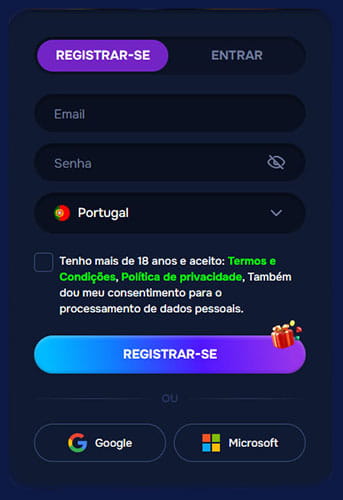 The registration form asks for the basic information required to create your account. You need a valid email address, a password and your country of residence.
- Enter an email address you can access.
- Create a secure password.
- Select your country.
- Confirm that you meet the minimum age requirement.
- Accept the Terms & Conditions.
- Confirm that you have read the Privacy Policy and Responsible Gaming Policy.
The casino sign-up process creates one personal player account. Use your own details and do not register another account if you already have one.
Sign Up with Google or Microsoft
Google and Microsoft are also available as alternative registration options. These methods provide another way to create your account, but the same age, eligibility and account verification rules still apply.
How Registration Works
- Open the registration form.
- Enter your email address and create a password.
- Select your country.
- Complete the required age and policy confirmations.
- Create your account.
Once registration is complete, you can open your player area and add the remaining personal information to your profile.
Complete Your Player Profile
Personal Information
Your profile allows you to keep the personal details connected to your account up to date. Available fields include first name, last name, date of birth, country, city, post code, full address, phone number and gender.
Use information that matches your identity documents. Correct details are important if verification is requested later, particularly before certain payment operations.
Email and Account Details
Your registered email is linked to account communication and password recovery. The profile also shows whether the email address has been verified.
If you forget your password, use the recovery option from the login area and enter the email connected to your account. Follow the instructions sent to that address to restore access.
Verification and Account Security
Identity Verification
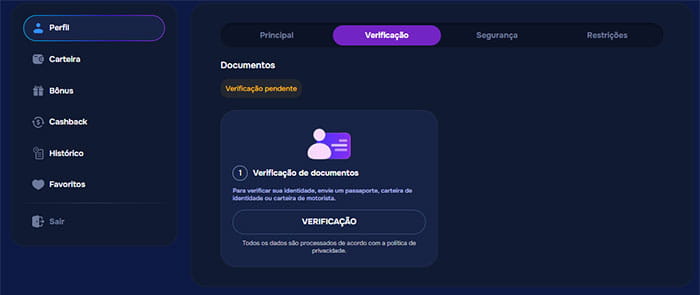 Wizardo may request identity verification as part of its KYC procedures. Depending on the account and transaction, you may be asked to provide an identity document, proof of address or confirmation that a payment method belongs to you.
Additional verification, including a selfie or video check, may also be requested where required. If Wizardo sends a verification request, provide the requested information within the stated period.
Security Settings
Keep your password private and do not share your account credentials with another person. Two-factor authentication is available as an additional way to protect access to your account.
Security settings can be managed from the corresponding section of your player profile.
What You Can Access After Registration
After creating your account, the player area gives you access to the main Wizardo account functions:
- Profile — personal information, verification, security and restrictions.
- Wallet — deposits, withdrawals and available payment options.
- Bonuses — available and activated promotions.
- Cashback — cashback information and available rewards.
- History — account and transaction activity.
- Favorites — games saved for quicker access.
You can also check your balance, access deposit options, enter promotional codes when available and follow your loyalty progress from the account area.
Your First Deposit and Welcome Offer
Creating an account does not automatically make promotional funds available for withdrawal. A casino bonus on registration is linked to the qualifying deposit conditions of the relevant promotion rather than account creation alone.
Welcome Package
The current welcome package combines up to 225% in bonus funds and 225 Free Spins across the first three qualifying deposits:
| Deposit | Offer | Reward | Minimum deposit |
|---|---|---|---|
| 1st | 1st Lucky Spell | 100% + 100 Free Spins | €20 |
| 2nd | 2nd Power Boost Spell | 50% + 50 Free Spins | €20 |
| 3rd | 3rd Win Spell | 75% + 75 Free Spins | €20 |
Each offer has its own wagering period, maximum bet and cashout conditions. Check the active promotion before making the qualifying deposit.
Logging In and Recovering Access
How to Log In
To log into Wizardo, open the account access form and enter the credentials connected to your registered account. Continue using the same account whenever you return rather than creating another registration.
Forgot Your Password?
If you cannot remember your password, use the password recovery option and enter your registered email address. Follow the instructions sent by email to create a new password and regain access to your account.
The same player account can also be used from a mobile browser or through the Wizardo PWA. The casino app experience does not require a separate registration or a second player profile.
Registration Help
If registration cannot be completed, first check that your email and password have been entered correctly, a country has been selected and all mandatory confirmations are completed.
If you already have a Wizardo account, use your existing credentials instead of creating a duplicate account. When verification is requested, complete the required steps from your profile. If you still cannot access or create the account, contact Wizardo support through an available support channel.
FAQ
How do I create a Wizardo account?
Open the registration form, enter your email address and password, select your country and complete the required confirmations. You can then create your player account and complete the remaining profile details.
Can I register with Google or Microsoft?
Yes. Google and Microsoft are available as alternative ways to create an account. The standard age, eligibility and verification requirements still apply.
Do I need to select my country during registration?
Yes. Country selection is part of the registration form and should match the personal information associated with your account.
What information do I need to add to my profile?
Your profile can include your name, date of birth, country, city, post code, address, phone number and gender. Additional information may be requested if account verification is required.
Do I need to verify my account?
Wizardo may request KYC verification depending on the account and transaction. This can include identity, address and payment ownership checks.
Can I create more than one Wizardo account?
No. Each player should use a single account. Additional restrictions also apply to multiple accounts associated with the same household, IP address or device.
What is the minimum age to register?
You must be at least 18 years old. If the applicable law sets a higher minimum gambling age, that higher requirement applies.
Can I make a deposit after registration?
Yes. Once the account has been created, you can access the Wallet and choose from the deposit options available for your account.
How do I recover my password?
Use the password recovery option in the account access area and enter your registered email. Follow the instructions sent to that address to set a new password.
Sign up now to access the available games and promotions.