
Deposit and Withdraw methods
At Wizardo Casino, you can manage deposits, withdrawals and balance checks directly from your account. The Wallet area lets you add funds and request withdrawals, while History helps you follow the status of your operations.
Available methods may vary depending on your country, currency, payment provider and account verification status. Before you confirm any operation, we recommend checking the limits, currency, method and details shown in your player area.
Payment methods in your account
We show payment methods according to the options available for your profile. Cards and digital wallets can be useful for simple operations, while bank transfers and cryptocurrencies require extra attention to the details entered.
The final list of methods appears when you start a deposit or withdrawal. If a method is not visible in your account, it is not available for your profile at that time.
Payments summary
| Item | Details |
|---|---|
| Deposit | From €5 to €5,000 |
| Withdrawal | From €50 to €5,000 |
| Quick amounts | €20, €100, €250, €500, €1K |
| Supported currencies | EUR, PLN, USD, ZAR, ARS |
| Deposits | Profile → Wallet → Deposit |
| Withdrawals | Profile → Wallet → Withdrawal |
| History | Profile → History → Transactions |
| Verification | KYC may be requested before withdrawal |
Where to manage money in your Wizardo account
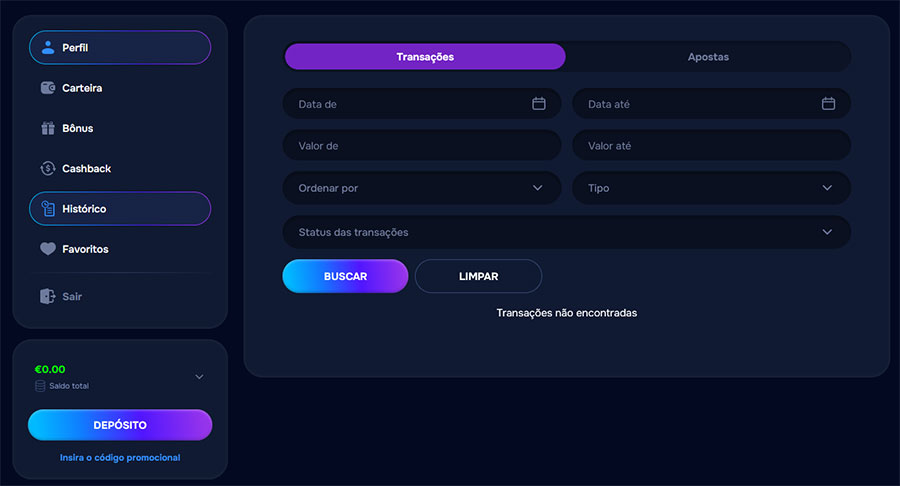 In the Profile menu, Wallet is the main area for financial operations. From there, you can choose a deposit method, add funds or request a withdrawal.
You can also use the Deposit button in your account balance block. The link to enter a promotional code appears in the same area, which can be useful when an offer requires activation before payment.
Deposit methods
To deposit, open the Deposit tab, choose the method, enter the amount and confirm the operation. The displayed deposit range is from €5 to €5,000.
Cards, banks and Open Banking
Among card and banking methods, you may find Visa & MasterCard, Open Banking, Bank Transfer, Sparkasse, Deutsche Bank, Commerzbank and Volksbanken Raiffeisenbanken.
The availability of specific banks depends on your country, payment provider and account settings.
Digital wallets, vouchers and local options
Google Pay, Apple Pay, AstroPay Card, CashtoCode, ecoPayz, eZeeWallet, Flexepin, Jeton, MB, Neosurf and BLIK may also be available.
Some of these options may work only for deposits. Always confirm the list shown in your profile before starting the payment.
Cryptocurrency deposits
Crypto options include BTC / Bitcoin, ETH / Ethereum, LTC / Litecoin, USDT / Tether, USDC, SOL / Solana, TRX / Tron, BNB, TON and Ripple.
Before sending funds, check the selected asset and the details shown in the payment window. Do not use networks or wallets that are not indicated on the operation page.
How to deposit
- Log in to your Wizardo account.
- Open the Profile menu.
- Select Wallet or use the Deposit button.
- Choose the Deposit tab.
- Select the payment method.
- Enter the amount or use a quick button.
- Add a promotional code or activate a bonus, if applicable.
- Confirm the deposit.
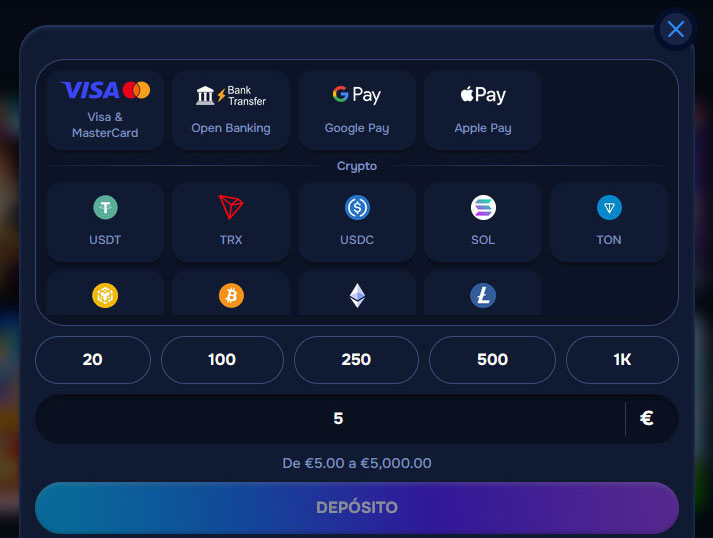 Quick buttons may include €20, €100, €250, €500 and €1K. If you prefer another value, enter the amount manually within the permitted range.
Using a bonus or promo code
Some deposits may include the Use bonus option or a Promotional code field. To take part in an offer, activate the relevant option before confirming the payment.
Promotional funds may have wagering requirements, validity periods, maximum bet limits and withdrawal limits. These rules are separate from standard deposit rules and should be checked in the active promotion.
Available withdrawal methods
You can request withdrawals from Wallet → Withdrawal. The displayed range for withdrawal requests is from €50 to €5,000, subject to available balance and required checks.
| Type | Withdrawal methods | What to check |
|---|---|---|
| Cards | Visa & MasterCard | The method must belong to the account holder. |
| Bank transfer | SEPA | Bank details and verification may be requested. |
| Cryptocurrencies | USDT, USDC, ETH, LTC, SOL, TRX, BTC, BNB | Confirm the asset and details before sending the request. |
How to request a withdrawal
- Open the Profile menu.
- Go to Wallet.
- Select Withdrawal.
- Check the Available for withdrawal field.
- Choose the available method.
- Fill in the required details.
- Enter the amount.
- Click Send.
Checks before withdrawals
We may request KYC verification before processing withdrawals, especially for the first request. Verification may include an identity document, proof of address, a bank statement and proof of ownership of the payment method.
All methods used must belong to the Wizardo account holder. Third-party payments are not allowed, and transactions may be reviewed for security, fraud prevention and AML reasons.
Why a withdrawal may be unavailable
- Wagering is still active.
- The deposit turnover has not been completed.
- There is locked bonus balance.
- KYC verification has not yet been approved.
- Ownership of the payment method needs confirmation.
- The requested amount is outside the available limits.
Deposit turnover rule
As a general rule, a deposit must be wagered 3 times before it can be withdrawn. In specific cases, this requirement may be reduced by the company, but never below 1 time the deposited amount.
Example: if you deposit €50, the standard turnover is €150 in bets before a withdrawal request. This rule is separate from bonus wagering.
Currencies, limits and method availability
The supported currencies are EUR, PLN, USD, ZAR and ARS. The displayed limits are €5–€5,000 for deposits and €50–€5,000 for withdrawals.
No daily, weekly or monthly limits were specified in the available data. For this reason, always check the limits shown for the selected method before confirming the operation.
How to check payments in History
The History section lets you track your account operations. For payments, use the Transactions tab; the Bets tab is separate for betting history.
In the filters, you can search by Date from, Date to, Amount from, Amount to, Sort by, Type and Transaction status. Use Search to look for records and Clear to reset the filters.
Refunds and cancelled requests
We review refunds only in exceptional situations. For a request to be considered, you must contact customer support within 24 hours after the transaction.
The response may take up to 10 business days. A deposit, or the related bonus, cannot be refunded after it has been used to place a bet.
Payment support
If a deposit does not appear, first confirm that the payment was completed by the selected provider. Then check your Wallet balance and the History → Transactions section.
If a withdrawal remains pending, review KYC, wagering, active bonus, payment method ownership and limits. For help, contact our support through Live Chat or the official channel shown in your account.
FAQs
Where do I make deposits at Wizardo Casino?
You can make deposits from Profile → Wallet → Deposit. You can also use the Deposit button in your account balance block to open the payment area.
What deposit methods are available?
You may find cards, banks, Open Banking, digital wallets, vouchers, local methods and cryptocurrencies. Options include Visa & MasterCard, Google Pay, Apple Pay, CashtoCode, ecoPayz, Jeton, BLIK, BTC, ETH, USDT and other available crypto assets.
What is the minimum deposit?
The minimum deposit shown is €5. The maximum amount shown is €5,000, but the selected method may display its own conditions.
What is the minimum withdrawal?
The displayed withdrawal range is from €50 to €5,000. Before sending the request, confirm the limit shown for the selected method.
Can I withdraw with cryptocurrencies?
Yes, there are crypto options for withdrawals. The confirmed cryptocurrencies for withdrawals include USDT, USDC, ETH, LTC, SOL, TRX, BTC and BNB.
Why do I need to verify my account before withdrawing?
We use verification to confirm that your account and payment method belong to the same player. It is also part of security, fraud prevention and AML/KYC controls.
Can I use another person’s card or wallet?
No. All payment methods must belong to the Wizardo account holder. Third-party payments are prohibited and may lead to payment review, transaction refusal, account restrictions or other measures under the applicable rules.
What does wagering the deposit before withdrawal mean?
It means that the deposited amount must be played before it can be withdrawn. The general rule is 3x the deposit, separate from any active bonus wagering.
Where can I see the status of a transaction?
You can check transaction status in Profile → History → Transactions. You can filter by dates, amounts, type and status to find a specific operation.
Why do I also see the Bets tab in History?
History separates payments and bets. For deposits and withdrawals, use Transactions; for betting history, use Bets.
What should I do if the deposit does not reach my balance?
Confirm that the payment was completed by the provider used and check History → Transactions. If the operation is complete and the balance has not been updated, contact our support through Live Chat or the official account channel.
Sign up now to access the available games and promotions.